
Motivation behind this project
I started this project to solve a common pain point for photographers and their clients: distributing and finding photos inside large batches. During an internship I noticed clients frequently had trouble locating specific photos in the large folders photographers sent. That observation became the spark for this project.
My goals were simple:
- Make it easy for clients to browse and find photos quickly.
- Provide a lightweight, fast web interface for distribution and search.
- Keep the system simple to deploy and maintain (Next.js frontend + FastAPI backend).
- This app is specifically for use of Photographer to ease photo distribution.
This draft will explain the motivation, the high-level architecture, implementation highlights, and some ideas for future improvements.
What to expect in this post
- A concise system overview and the role of each component
- Key implementation details, trade-offs and performance considerations
- Screenshots or diagrams where useful and a short demo flow
- Next steps, limitations and ideas for future improvements
- Link to the GitHub repository (note: the code is exploratory / prototype-level)
Tech stack
- FastAPI — backend API and processing endpoints
- PostgreSQL — primary relational database for metadata
- Redis — message broker/cache
- Celery — background workers and async image processing
- InsightFace — local face-detection/embedding model for search
- Next.js + shadcn/ui — frontend and dashboard
- Docker — containerized local development (optional)
Architecture (high level)
From a user’s perspective the app has two primary surfaces:
- Photographer dashboard — connect storage (Google Drive), upload or select folders, trigger processing, and configure access to events.
- Client access point — a lightweight gallery where event attendees can browse, search, and download images shared by the photographer.
The diagrams below illustrate the high-level flow and a more detailed component view.
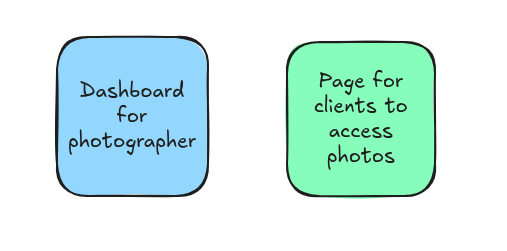
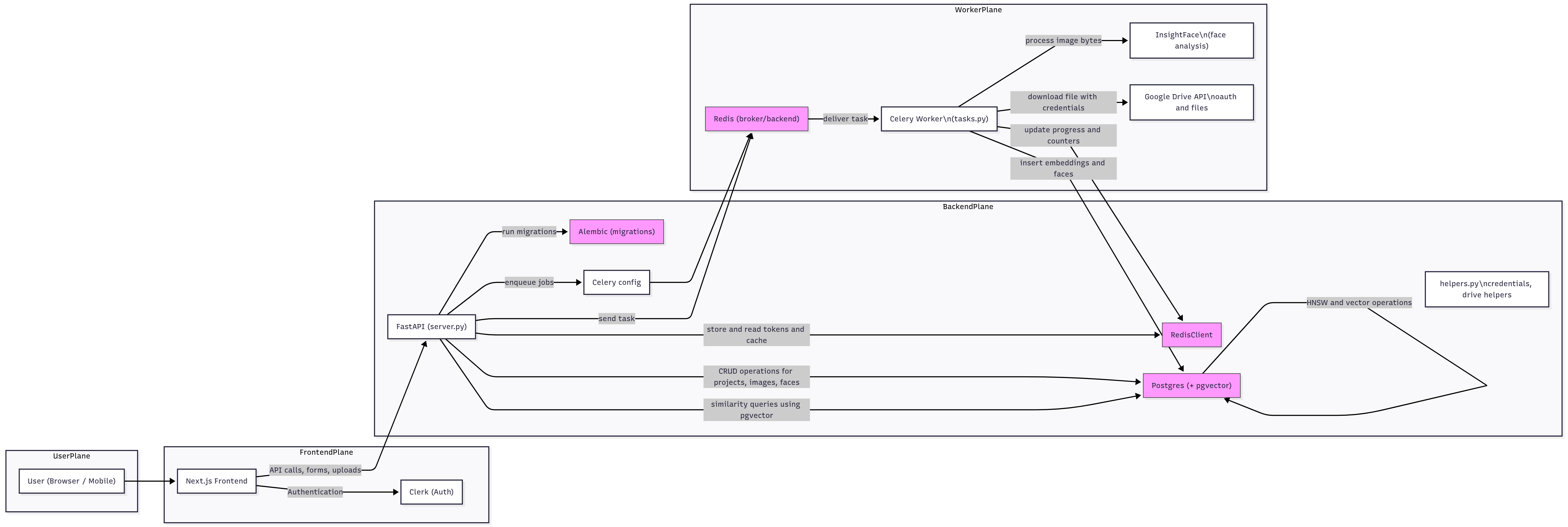
Key details from the diagram:
- Auth: I use Clerk to offload authentication and user management so I can focus on product logic.
- Storage integration: Photographers can connect Google Drive. The app reads images from selected folders for processing.
- Processing: Images are processed by worker jobs (Celery) using InsightFace to extract face embeddings and basic metadata (timestamp, dimensions, EXIF where available).
- Search: Face embeddings and metadata are used to power search / grouping (for example, show all photos that match a person).
- Async & scaling: Workers run off a Redis queue to avoid blocking requests during CPU-bound image processing.
Privacy and storage strategy
I intentionally minimize storing raw images on the server. The worker downloads an image, extracts metadata and embeddings, then deletes the local copy. Where possible the UI uses Google Drive thumbnail URLs instead of storing thumbnails locally. This reduces storage cost and improves privacy by keeping full-size images in the owner’s cloud storage.
Implementation notes and trade-offs
- Local face models (InsightFace) avoid sending images to third-party APIs but increase CPU/GPU requirements on the server or worker hosts.
- Storing only metadata keeps costs down, but relies on external storage availability (e.g., Google Drive links may expire). A hybrid approach (cache thumbnails for a short duration) can help.
- Using Clerk simplifies auth but adds an external dependency; it’s a good trade for a prototype.
The rest is just the implementation of all this, you an go through the repo here
Meet you in the next blog!!